free study tool
Cornell notes template
what is the Cornell notes format?
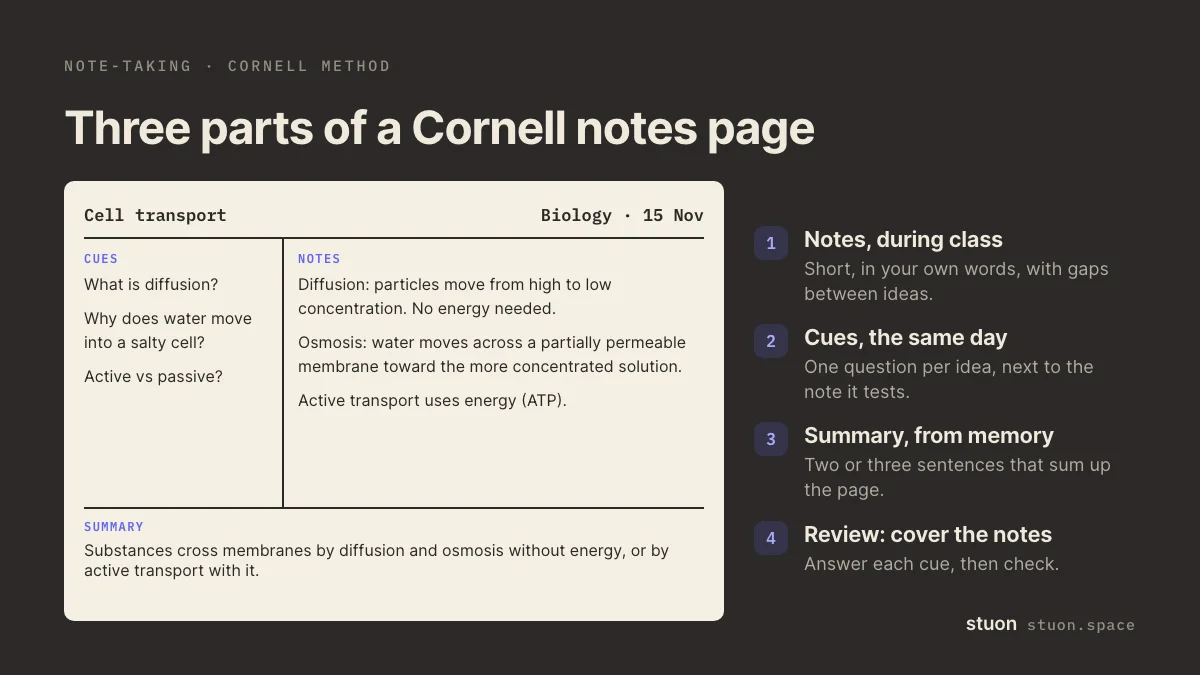
A Cornell notes page has three parts: a wide notes area on the right for notes during class, a narrow cue column on the left for questions and keywords you add afterwards, and a summary strip at the bottom. To review, you cover the notes and answer the cues from memory.
by Vusal Imranli updated 10 Oct 20263 min read
use this result
Keep a focus timer and site blocker in your Chrome toolbar.Add to Chrome, free
How to use the template
- Notes during class or reading. Write short notes in the large box, in your own words. Leave a blank line between ideas so cues have somewhere to sit.
- Cues after class. The same day, read the notes and write one question or keyword per idea in the cue column. "What drives osmosis?" works better than "osmosis".
- Summary. Write two or three sentences at the bottom that sum up the page. Do it from memory first, then check.
- Quiz yourself. Press Quiz me on the cues. The notes blur, and you answer each cue aloud or on paper before you look.
- Review on a schedule. Repeat the quiz after a few days and before the test. Each review is a recall test, not a reread.
The page saves what you type in this browser, so you can close it and come back. Print these notes gives you a clean copy with the classic layout. Print a blank template gives you an empty ruled page to fill in by hand.
Where the method comes from
The system was developed by Walter Pauk, an education professor at Cornell University, and described in his book How to Study in College. Cornell's Learning Strategies Center still teaches it.
Its value is in the cue column. Turning notes into questions forces you to process them once, and covering the notes to answer those questions is active recall. Plain note-taking without that second step is closer to rereading, which the research rates as a weak way to learn (Dunlosky et al., 2013).
Common mistakes
- Copying slides word for word. The notes should be short and in your own words.
- Leaving the cue column empty. Without cues, the page is just notes and the review becomes rereading.
- Writing cues as topics instead of questions. A question tells you what to recall; a topic only tells you what to look at.
- Skipping the summary. It is a short blurting exercise: what is the page about, from memory?
- Reviewing only before the test. Spread the reviews out, as in spaced repetition.
Frequently asked questions
Can I print a blank Cornell notes template?
Yes. Press Print a blank template for a ruled page with a cue column, a notes area and a summary box. In the print dialog you can also save it as a PDF.
Should the cues be questions or keywords?
Questions work better for review, because each one asks you to recall something specific. Keywords are fine for definitions and names.
Does Cornell note-taking work for maths?
Yes, with worked examples in the notes area and cues such as "When do I use the chain rule?" Practise the problems themselves as well; reviewing notes is not the same as solving.
Is my text uploaded?
No. The tool runs in your browser. Nothing you type is sent anywhere, and anything saved stays in this browser only.
Sources
Related pages
Turn studying into a game
Stuon logs your sessions, builds your streak and draws your heatmap, so progress stays visible.
Continue in StuonAdd to Chrome, freeor use the free version without an account