free study tool
Spaced repetition schedule generator
how do you make a spaced repetition schedule?
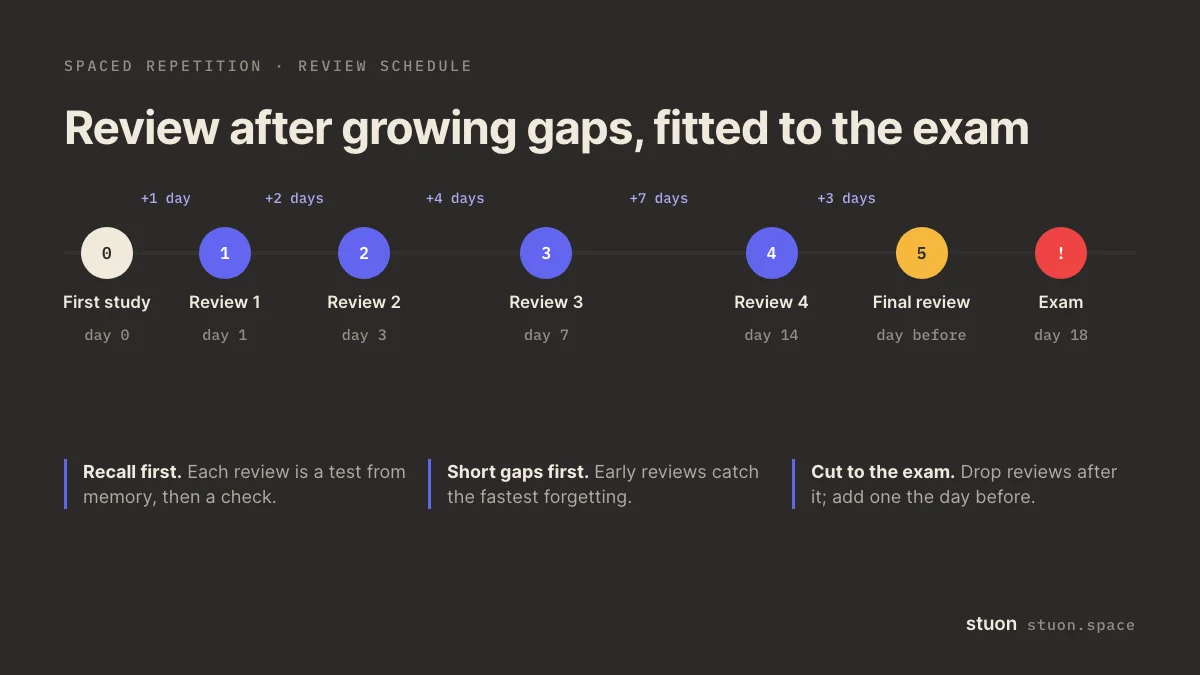
Pick the day you first study a topic and review it after growing gaps, for example 1, 3, 7, 14 and 30 days later. If the exam comes first, drop the reviews after it and add one the day before. Each review should be a recall test, not a reread.
by Vusal Imranli updated 10 Oct 20264 min read
Days are counted from the first study day. With an exam date, reviews on or after the exam are dropped and the day before it becomes a final review.
use this result
Keep a focus timer and site blocker in your Chrome toolbar.Add to Chrome, free
How to use the generator
- Name the topic and the first study day. Use one row per topic or chapter, so each has its own dates.
- Add the exam date if there is one. Reviews on or after the exam are dropped, and the day before the exam is added as a final review.
- Choose the gaps. Start with 1, 3, 7, 14 and 30 days, or pick doubling gaps, or type your own.
- Add the dates to your calendar. Add to calendar downloads an .ics file with one all-day event per review. Google Calendar, Apple Calendar and Outlook can import it.
How long should the gaps be?
There is no single best schedule. A large review of the research found that spreading study over time beats massing it, across many kinds of material (Cepeda et al., 2006). A later study found that the best gap depends on how long you need to remember: for a test about a week away, roughly 10 to 20% of that time worked best, and the share got smaller for longer delays (Cepeda et al., 2008).
In practice: short gaps first, longer ones later. 1, 3, 7, 14, 30 is a reasonable default for a test a month or more away. For an exam in ten days, use short gaps such as 2, 5 and the day before. The forgetting curve visualizer shows why the early reviews matter most.
What to do on a review day
- Recall first. Write or say what you remember about the topic, or answer your cards, before opening the notes. See active recall.
- Check against the source and mark what you missed.
- Restudy only the misses, briefly.
- If a review went badly, add an extra one a day or two later. If it was easy, the next gap can be longer.
For flashcards, the Leitner box simulator moves each card on its own schedule. For whole topics, dated reviews like these are simpler to keep. In a study with flashcards, spacing beat cramming for most learners, even though cramming felt more effective at the time (Kornell, 2009).
Frequently asked questions
What is the 1-3-7 rule?
A common shorthand for reviewing one, three and seven days after first study. It is a starting point, not a rule from the research. Add later reviews for material you need for weeks or months.
Can I add the schedule to Google Calendar?
Yes. Download the .ics file, then in Google Calendar choose Settings, Import and export, Import, and select the file.
What if I miss a review day?
Do it as soon as you can and count the next gap from that day. A late review is still much better than none.
Is my text uploaded?
No. The tool runs in your browser. Nothing you type is sent anywhere, and anything saved stays in this browser only.
Sources
- Cepeda et al. (2006), Distributed practice in verbal recall tasks: a review and quantitative synthesis. Psychological Bulletin.
- Cepeda et al. (2008), Spacing effects in learning: a temporal ridgeline of optimal retention. Psychological Science.
- Kornell (2009), Optimising learning using flashcards: spacing is more effective than cramming. Applied Cognitive Psychology.
- Hermann Ebbinghaus (1885), Über das Gedächtnis (On Memory). Original description of the forgetting curve.
Related pages
Turn studying into a game
Stuon logs your sessions, builds your streak and draws your heatmap, so progress stays visible.
Continue in StuonAdd to Chrome, freeor use the free version without an account