study method
Leitner system
what is the Leitner system?
The Leitner system is a way to schedule flashcards using numbered boxes. Every card starts in box 1. A card you answer correctly moves up one box, and a card you miss goes back to box 1. Lower boxes are reviewed often and higher boxes less often.
by Vusal Imranli updated 10 Oct 20265 min read
How the Leitner system works
Sebastian Leitner, a German science journalist, described the card-box system in his 1972 book So lernt man lernen. It is a paper version of spaced repetition: cards you know are seen less and less often, and cards you miss come back quickly.
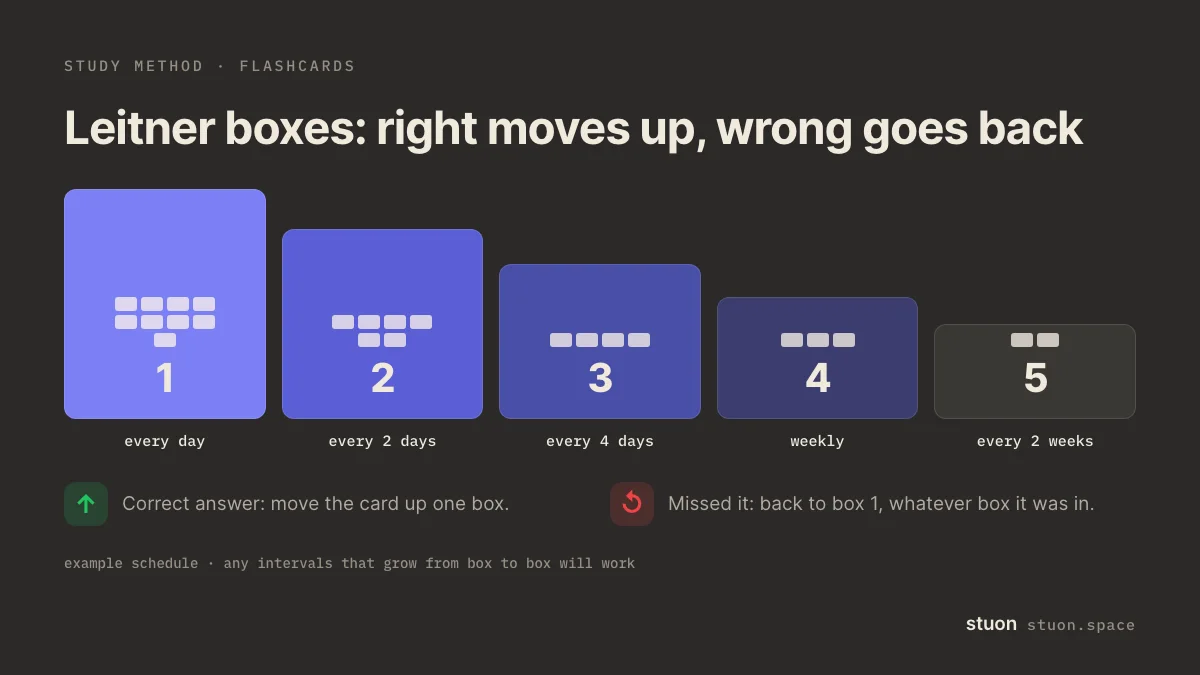
The two ideas behind it are well studied. Spreading reviews over time beats cramming them together (Cepeda et al., 2006), and answering a card before flipping it is retrieval practice. Kang (2016) reviews how spaced retrieval can be built into everyday study. The exact intervals in the diagram are an example, not a research finding.
To watch cards move between boxes before you build a real set, try the Leitner box simulator.
How to set up Leitner boxes, step by step
- Make the cards. One question per card, answer on the back. Keep each card to one fact or step.
- Label the boxes. Use five boxes, envelopes or piles. Decide how often each is reviewed, for example box 1 daily, box 2 every 2 days, box 3 every 4 days, box 4 weekly, box 5 every 2 weeks.
- Start everything in box 1. Add new cards to box 1 only, a manageable number per day.
- Review the boxes that are due. Answer each card aloud or on paper before flipping. Right: move it up one box. Wrong: move it back to box 1.
- Retire or keep cards in the last box. A card that stays correct in box 5 can leave the system until your final pre-exam check.
When to use Leitner boxes
- Vocabulary, definitions, formulas, dates and other short facts.
- Courses that run for weeks or months, where cards build up.
- When you want spaced repetition without an app.
Benefits of the Leitner system
- You spend most time on the cards you get wrong.
- The box numbers show your progress at a glance.
- It needs only paper, a pen and a few envelopes.
Common mistakes with the Leitner system
- Flipping the card before committing to an answer. That is recognition, not recall.
- Moving a card up because you "nearly" knew it. Only a full, correct answer counts.
- Adding 100 new cards on one day, so box 1 becomes too big to review.
- Skipping a due box. The system only works if the schedule is kept.
The Leitner system example
Monday: 20 new verb cards go into box 1. You get 12 right; they move to box 2. Eight stay in box 1.
Tuesday: you review box 1 only. Five more move to box 2.
Wednesday: box 1 and box 2 are due. Two cards from box 2 are wrong and drop back to box 1. "Tener" keeps returning, so you add an example sentence to the card.
By the second week most cards sit in boxes 3 and 4, and your daily review takes a few minutes instead of twenty.
Leitner boxes vs flashcard apps
Apps such as Anki use algorithms that set a separate interval for each card. The Leitner system uses a fixed schedule per box, which is simpler and easier to see. Both use the same two principles: test yourself, and space reviews out.
Paper boxes suit people who want to handle real cards and avoid a phone. An app suits large decks. You can make printable cards with the flashcard generator and track the time you spend reviewing in a study tracker.
Frequently asked questions
How many boxes should a Leitner system have?
Five is common. Three works for a short course; more boxes stretch the longest interval further.
What intervals should I use?
Any schedule where each box is reviewed less often than the one before. Start with daily, 2 days, 4 days, a week and two weeks, then adjust to your exam date.
What happens to a card I get wrong in box 4?
In the classic system it goes back to box 1. Some students move it down one box instead, which is gentler but less strict.
Is the Leitner system the same as spaced repetition?
It is one way to do spaced repetition, with fixed intervals per box instead of a per-card algorithm.
Can I use the Leitner system for essay subjects?
Yes, for the facts inside essays: dates, names, quotes and definitions. Practise the argument itself with blurting or past questions.
Sources
- Sebastian Leitner (1972), So lernt man lernen. Herder. Original description of the card-box system.
- Cepeda et al. (2006), Distributed practice in verbal recall tasks: a review and quantitative synthesis. Psychological Bulletin.
- Kang (2016), Spaced repetition promotes efficient and effective learning. Policy Insights from the Behavioral and Brain Sciences.
- Roediger and Karpicke (2006), Test-enhanced learning: taking memory tests improves long-term retention. Psychological Science.
Related methods
Practice it, then keep a record
Stuon has a timer, a blurting space and flashcards, and it logs the time you spend on each.
Track this in StuonAdd to Chrome, freeor use the free version without an account