study method
Cornell note-taking method
what is the Cornell note-taking method?
The Cornell method is a note-taking layout with three areas: a wide column for notes taken in class, a narrow cue column for questions and keywords added afterwards, and a short summary at the bottom. You revise by covering the notes and answering from the cues.
by Vusal Imranli updated 10 Oct 20265 min read
How Cornell note-taking works
Walter Pauk, an education professor at Cornell University, described the system in his book How to Study in College. The page layout does two jobs. During the lecture you only write in the notes column. After the lecture you turn the notes into questions in the cue column, which is where most of the learning happens.
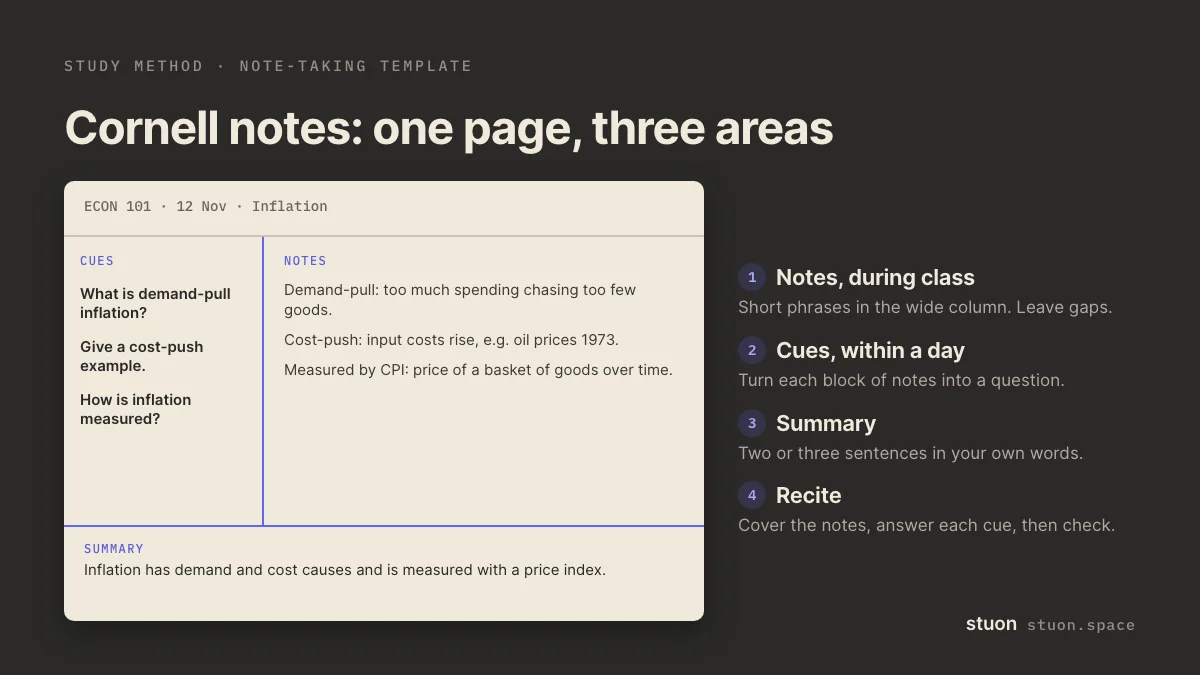
The layout itself is not magic. Most of the evidence for Cornell notes is classroom experience rather than controlled trials. What makes it useful is that the cue column sets up active recall: cover the right side, read a cue, answer, and check. Recall of that kind has strong research support (Roediger and Karpicke, 2006).
How to take Cornell notes, step by step
- Set up the page. Draw a vertical line about a third of the way in from the left, and a horizontal line about five lines from the bottom. Put the course, date and topic at the top.
- Take notes on the right. During the lecture or reading, write short notes in the wide column. Use abbreviations and leave gaps between ideas.
- Write cues on the left, within a day. Turn each block of notes into a question or keyword. "Three causes of the 1929 crash" becomes "What caused the 1929 crash?"
- Summarise at the bottom. In two or three sentences, write what the page is about in your own words.
- Recite from the cues. Cover the notes column. Answer each cue aloud or on scrap paper, then uncover and check. Repeat on later days.
When to use Cornell note-taking
- Lectures and readings where you take notes by hand or in a document.
- Subjects with many definitions, causes, processes and examples.
- When your notes pile up and you never look at them again.
Benefits of Cornell note-taking
- Your notes become a self-test without any extra cards.
- Writing cues the same day forces a quick review while the lecture is fresh.
- The summary line makes a stack of notes fast to scan before an exam.
Common mistakes with Cornell note-taking
- Leaving the cue column empty. Without cues it is just a page with a margin.
- Writing cues that are labels ("Krebs cycle") instead of questions ("What does the Krebs cycle produce?").
- Rereading the notes column instead of covering it.
- Copying the lecture slides word for word, which leaves no room to think.
Cornell notes example
Notes column: "Demand-pull: too much spending chases too few goods. Cost-push: input costs rise, e.g. oil 1973. Measured by CPI, basket of goods."
Cue column, written that evening: "What is demand-pull inflation?", "Give a cost-push example.", "How is inflation measured?"
Summary: "Inflation has demand and cost causes and is measured with a price index."
Two days later you cover the notes and answer the three cues. You forget what CPI stands for, so you mark that cue for the next review.
Cornell notes on a laptop or tablet
The layout works digitally. Use a two-column table with the cue column on the left and a summary row at the bottom, or a template in your note app. Keep the rule that cues are written after class, not during.
If you turn cues into flashcards, the flashcard generator can help, and the Leitner system gives you a simple review order. For other ways to test yourself from notes, see blurting.
Frequently asked questions
What are the three parts of Cornell notes?
A notes column for content, a cue column for questions or keywords, and a summary area at the bottom of the page.
Is the Cornell method better than other note-taking methods?
There is little strong evidence that one layout beats another. The Cornell method helps because it builds in self-testing. Any notes you quiz yourself on will do similar work.
When should I fill in the cue column?
Within a day of the lecture, while you still remember the context. Pauk recommended doing it as soon as possible.
Can I use Cornell notes for maths?
Yes. Put worked steps in the notes column and questions such as "When do I use integration by parts?" in the cue column.
How big should the cue column be?
About a third of the page width or less. It only needs room for short questions.
Sources
- Walter Pauk, How to Study in College. Houghton Mifflin. The book that popularised the Cornell system.
- Cornell University Learning Strategies Center, The Cornell Note Taking System.
- Roediger and Karpicke (2006), Test-enhanced learning: taking memory tests improves long-term retention. Psychological Science.
- Dunlosky et al. (2013), Improving students' learning with effective learning techniques. Psychological Science in the Public Interest.
Related methods
Practice it, then keep a record
Stuon has a timer, a blurting space and flashcards, and it logs the time you spend on each.
Track this in StuonAdd to Chrome, freeor use the free version without an account