study method
Mind mapping for studying
what is mind mapping?
Mind mapping is a note-making method where you write a topic in the centre of a page and draw branches for its main subtopics, with smaller branches for details. The evidence for mind maps as a study method is mixed; they help most when you draw them from memory.
by Vusal Imranli updated 10 Oct 20264 min read
How mind mapping works
A mind map shows a topic's structure at a glance: what the main parts are and how details hang off them. Making one forces you to decide what belongs together, which is a form of chunking.
The research is mixed. In a small study of 50 medical students, those trained to mind-map a text recalled somewhat more after a week than students using their usual methods, but the result was uncertain and the mind-map group found the method less motivating (Farrand et al., 2002). A meta-analysis of concept and knowledge maps found modest benefits over reading text or lists (Nesbit and Adesope, 2006).
The most important finding is a comparison. When students made concept maps with the text open, they learned less than students who practised retrieving the text from memory (Karpicke and Blunt, 2011). So the useful version of mind mapping is the closed-book one.
How to make a mind map, step by step
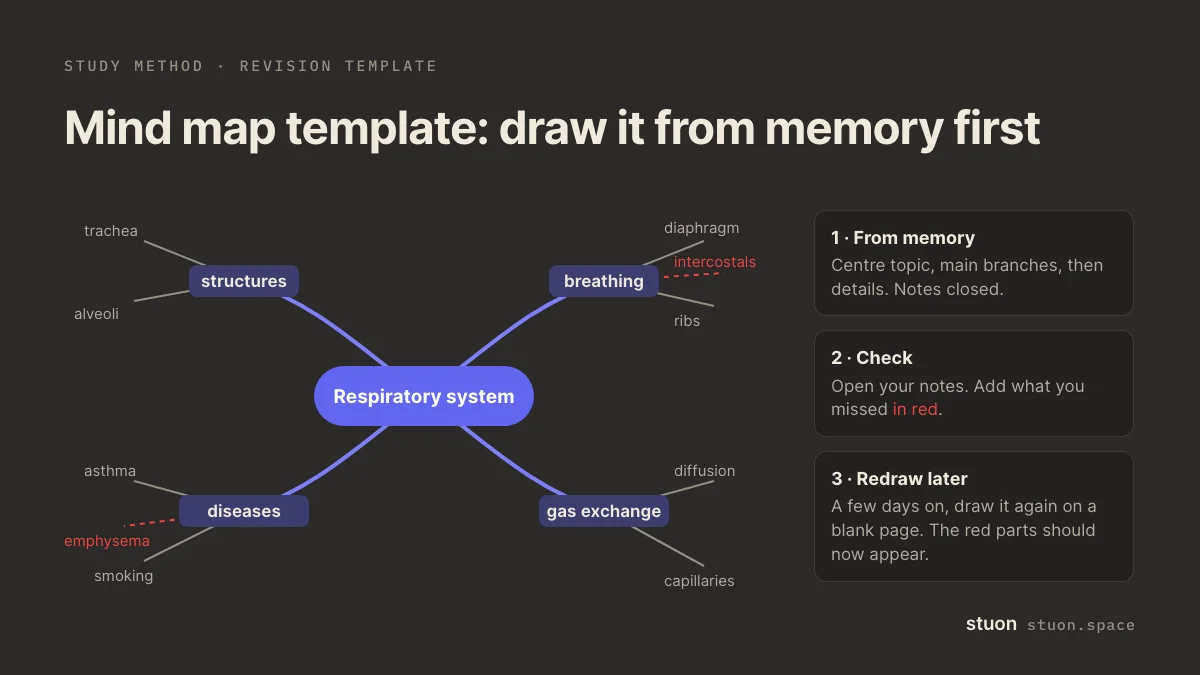
- Write the topic in the centre. Use a blank page in landscape. One topic per map.
- Draw the main branches from memory. Before opening your notes, add three to six branches for the main subtopics you remember.
- Add details from memory. Add keywords, examples, formulas and links between branches. One or two words per line.
- Check and fill gaps. Open your notes. Add what you missed in a different colour. Those coloured parts are your revision list.
- Redraw it later. A few days later, draw the map again on a blank page and compare with the first version.
When to use mind mapping
- Getting an overview of a topic or a whole unit before an exam.
- Planning essays, where you need to see arguments and evidence together.
- Topics with a clear hierarchy of parts and subparts.
Benefits of mind mapping
- It shows how ideas connect, which linear notes can hide.
- Drawn from memory, it is a quick blurting-style recall test.
- A finished map fits a whole topic on one page.
Common mistakes with mind mapping
- Copying the textbook into map form. That feels productive but is mostly transcription.
- Spending most of the time on colours and drawings.
- Writing full sentences on the branches, which hides the structure.
- Making the map once and never testing yourself on it.
Mind mapping example
Centre: "Respiratory system". From memory you draw four branches: structures, breathing, gas exchange, diseases.
You add details: trachea, bronchi, alveoli; diaphragm contracts; diffusion; asthma. Under diseases you can only think of one.
Checking your notes, you add emphysema and the role of the intercostal muscles in red. Next week you redraw the map and both appear.
Mind maps vs concept maps
Mind maps radiate from one central topic. Concept maps can have several starting points and label each link with a phrase such as "causes" or "is part of". Concept maps take longer but show relationships more precisely. Both are forms of dual coding.
If your goal is memory for an exam, a blank-page recall such as blurting gives similar benefits with less setup. If your goal is to see structure, a map is a good tool. For a reading routine with built-in recall, see SQ3R.
Frequently asked questions
Are mind maps good for studying?
They can help, but the evidence is mixed. Drawing them from memory and then checking is more effective than copying notes into map form.
Who invented mind maps?
Branching diagrams are old. The term "mind map" was popularised by the British author Tony Buzan from the 1970s.
Are mind maps better than linear notes?
There is no strong evidence that one format is better in general. Choose by the material: maps for structure, lists or Cornell notes for sequences and detail.
Should I use a mind-mapping app?
An app is easier to edit; paper is quicker to draw from memory. For recall practice, paper often works better.
How big should a mind map be?
One page for one topic. If it does not fit, split it into separate maps.
Sources
- Farrand, Hussain and Hennessy (2002), The efficacy of the "mind map" study technique. Medical Education.
- Nesbit and Adesope (2006), Learning with concept and knowledge maps: a meta-analysis. Review of Educational Research.
- Karpicke and Blunt (2011), Retrieval practice produces more learning than elaborative studying with concept mapping. Science.
Related methods
Practice it, then keep a record
Stuon has a timer, a blurting space and flashcards, and it logs the time you spend on each.
Track this in StuonAdd to Chrome, freeor use the free version without an account